
Skip to content
VerdictMill
Astra logoAstraResearch-basedWordPress plugins & themesUpdated 2026-11-27

Astra review: the light theme that most builders are installed on

By Milan Pasic•Published 2026-11-14•Updated 2026-11-27
Verdict

Astra is a free WordPress theme that stays under 50 KB and works with every page builder - Astra Pro at 99 USD a year adds the header builder, WooCommerce controls and templates that make it a complete site system.

No score: this page is research-based and has not been hands-on tested yet.

Research-based · not hands-on tested
Visit AstraLinks to the official site
149
The number that matters

USD on renewal for Astra Pro after a 99 first year - a 50% jump that three-year planning has to include

Best for

It fits blogs, business sites and small stores that want speed without a framework, and agencies that need a theme which behaves with any builder.

Not for

You want an all-in-one theme with layouts and a builder included - Divi is that product.

Pricing

Astra Pro 99 USD first year, renews at 149 USD/yr; three-site tier 199 USD first year, renews at 299 USD

Main limitation

The renewal jump. 99 becomes 149 without a discount to soften it, and three years of Pro costs about 400 USD.

Vendor artwork from wpastra.com. Screenshots were captured by us on 13 November 2026.

Current offers

No current offer for Astra. We checked the vendor's pricing page on 2026-11-16 and found no public discount, coupon or promotion. When one appears, we add it here with the date we verified it.

What we tested

Product
Astra
Type
Research-based · not hands-on tested

How it compares

AstraDiviElementorWP Rocket
Entry paid price99 USD first year, 149 renewing277 USD/yr60 EUR/yrabout 30 EUR/yr promo
Typethemetheme + builderbuilder plugincaching plugin
Free versionyes, full themenoyesno
Works with any builderyesnoit is the buildern/a
Affiliate programmeyesyesyesyes

Prices read from vendor pages on 13 November 2026 in the currency each displayed. Astra and Divi figures are USD; Elementor and WP Rocket are EUR.

Astra is the theme most WordPress sites end up on without their owners choosing it - it is the default in tutorials, the recommended theme in builder onboarding, and the one preselected by hosting installers. This astra review is about whether that default status is deserved, what Pro actually adds, and why the renewal price matters more than the first-year offer.

What Astra is

A free WordPress theme built for speed and compatibility. It ships with no page builder of its own and no bundled plugins, on the argument that the theme should render and the builder should build. The free version includes layout controls, container widths, basic typography and the hooks needed to pair with Elementor, the block editor, Beaver Builder or Bricks.

Astra Pro adds the structural features: a header and footer builder with sticky and transparent options, WooCommerce layout controls, blog and archive layouts, a mega menu, extended typography and access to the Starter Templates library and Spectra Pro blocks.

What you see before you sign up

The homepage promises speed and compatibility, and the speed claim is checkable: the theme is genuinely light, and a bare Astra install is one of the few WordPress themes that does not add a framework's worth of CSS to every page.

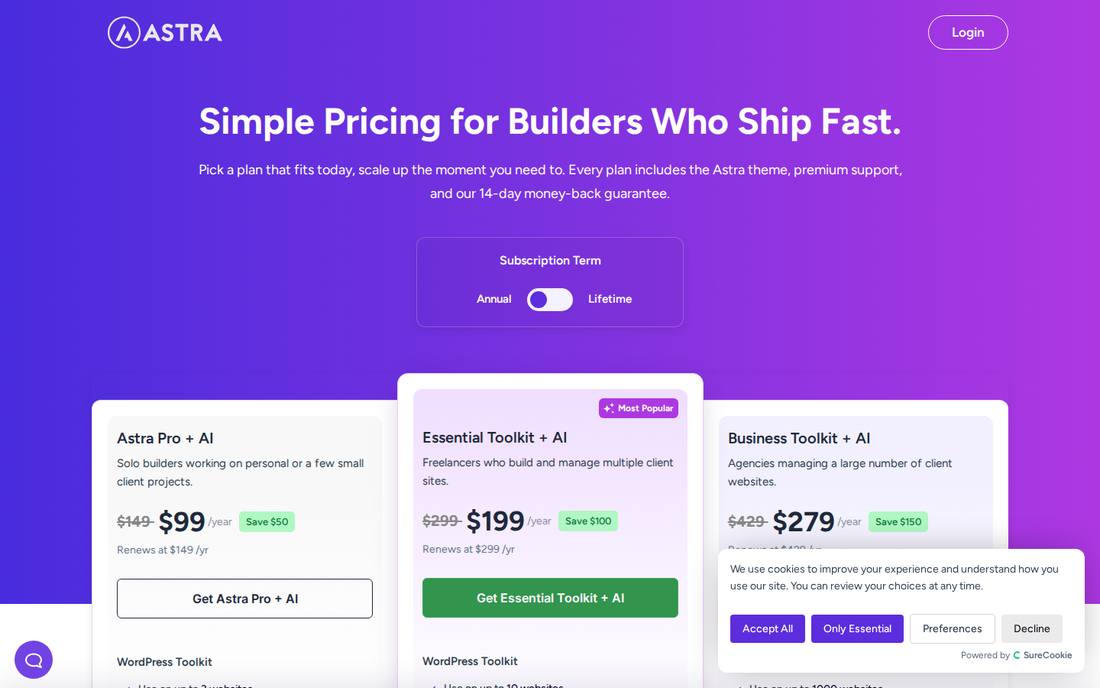
The pricing page is where attention is required. Astra Pro is 99 USD for the first year and 149 USD on renewal; the three-site tier is 199 first year and 299 on renewal. That is a legitimate model and it is the reverse of the teaser-then-double pattern, but it means the number in the headline is not the number you will pay in year two.

We are not enrolled in Astra's affiliate programme, so nothing here earns a commission; the affiliate disclosure explains how that is marked if it changes.

Free versus Pro, honestly

Free Astra renders a fast site and gives you basic control of the layout. What it does not give you is a header you designed: the options are combinations of logo position and menu alignment, not a builder. For a blog or a simple brochure site, that is fine and 99 USD buys nothing you need.

Pro starts to matter in three specific cases. You want a sticky header that changes on scroll. You sell products and want control over the product page layout without touching templates. You build client sites and need the header builder to reproduce a design a designer handed you. If none of those is true, stay free.

How it works with the rest of the stack

Three combinations cover most sites. Astra plus the block editor is the lightest and cheapest, and it is what a content site should use. Astra plus Elementor or Bricks is the common agency build, where the builder provides layout and Astra provides the container, header and WooCommerce shell. Astra plus Spectra is the vendor's own answer - blocks that fill the gaps the block editor leaves, included with Pro.

The important detail is that Astra does not fight any of them. Themes that bundle their own builder create conflicts; a theme that stays out of the way is worth more than its feature list suggests.

Where it fails

  • The renewal jump. 99 becomes 149 without a discount to soften it, and three years of Pro costs about 400 USD.
  • Header builder is good, not a design tool. Reproducing a custom design still needs CSS.
  • Feature sprawl across products. SureForms, SureCart, Spectra Pro and the templates are separate purchases, and the site sells them hard.
  • Starter Templates are a starting point, not a design. Sites built from them look like the template library.
  • Support is ticket-based and Pro-only; free theme users get the WordPress.org forum.

Who it is for, and who should skip it

It fits blogs, business sites and small stores that want speed without a framework, and agencies that need a theme which behaves with any builder. It fits anyone who has been handed a design and needs a header builder without buying a page builder.

Skip it if you want an all-in-one theme with layouts and a builder included - Divi is that product. Skip it if you need deep WooCommerce templates beyond layout control. And skip Pro if you have not yet hit a limit in the free theme; upgrading before you have a reason is how subscriptions accumulate.

How it compares with the other three

Against Divi, the difference is philosophy: Astra is a light theme that expects another tool to build pages, Divi is a theme and builder in one with lock-in attached. Against Elementor, they are complements - Astra is the theme most Elementor sites run on. Against WP Rocket, no overlap: one decides how the page is structured, the other decides how it is served.

The category is compared on /category/wordpress, and the test procedure behind a future score is in how we test.

The three-year cost, written down

Astra Pro: 99 + 149 + 149 = 397 USD. Divi Pro at 277 a year would be 831 USD over the same period, for unlimited sites. Elementor Essential at 60 EUR a year is about 180 EUR, and the free plugin may cover you for a year before that. Put next to each other, the cheap-looking option is not always the cheapest, and the expensive-looking one is not always wrong.

What we have not tested - and will

Research-based review: public pages plus our own captures, no licence. Open questions:

  • Page weight of a bare Astra install against GeneratePress and a default block theme
  • LCP for the same layout in Astra plus block editor versus Astra plus Elementor
  • How much of a designer's header can be built without custom CSS
  • WooCommerce page behaviour across three common checkout plugins
  • Update stability across two WordPress minor releases

Bottom line

Install the free theme and build one page. If the only thing missing is a header you can design, Pro at 99 USD is reasonable - and budget the 149 renewal from year two. If you need more than a header, the money is better spent on a builder and a light theme than on a theme that grows into one.

Astra's real achievement is restraint: it stays out of the way, which is why so many builders recommend it. That is worth more than any single feature in the Pro list.

Sources

The speed claim, examined

A theme cannot make a slow site fast; it can only avoid making it slower. Astra's contribution is a small CSS payload and no jQuery dependency for its own features. On a page where images are unoptimised and a builder adds 300 KB of assets, the theme is a rounding error.

Where the light theme does pay off is on the pages nobody optimises: archives, search results, author pages, the 404. Those pages are rendered from theme templates, and a theme that ships 20 KB instead of 200 KB keeps them usable on mobile connections and on cheap hosting where CPU is the limit.

Agency considerations

Two practical notes for anyone building client sites. The header builder makes it possible to reproduce a design without a child theme, which shortens the build; and the free theme on the client's install means the licence is yours, not theirs, so a client leaving does not lose their site's styling - only the header builder features.

Plan handover accordingly: if the client will maintain the site, either keep the renewal in your cost or move the header into a child theme before you hand it over.

A concrete recommendation

Three readers, three answers. A blogger with a content site: free Astra, no Pro, put the 99 USD into a caching plugin instead. A small business with a designed homepage and a shop: Astra Pro at 99, and accept the 149 renewal next year. An agency: the three-site tier, because reproducing client headers without a child theme pays for itself on the second project.

What none of them should do is buy Pro on day one, before they have installed the free theme and found its ceiling. That ceiling is the only useful comparison, and it is free to discover.


Our verdict

Updated 2026-11-27
Buy it if
You want a theme that stays under 50 KB and works with whichever page builder you already use. The free version covers most brochure and blog sites.
Skip it if
You need the header and footer builder, WooCommerce modules or the layout library - Astra Pro at 99 USD for the first year, but 149 USD on renewal, which is the number to plan with.
What we would do
Start free, add Pro only when you hit a specific blocked feature, and price three years rather than one: roughly 397 USD is the real cost of the paid path.

— Milan Pasic, editor. This is an editorial judgement, not a summary of the text above; the score follows the published method.

Milan Pasic

Editor. Writes the tests, runs the comparisons and publishes the numbers — including the ones that make a product look worse. Reviews are written and checked by a person, and every score follows the published method.

About · Editorial policy · LinkedIn

Related reviews

How it compares in this category

All WordPress plugins & themes reviews →
ProductScorePrice (1 site)TestedVerdict
Divi logoDivi—277 USD/yrnot testedDivi bundles a visual builder, a theme and a layout library into one subscription - Divi Pro at 277 USD a year - which suits agencies producing many sites and frustrates anyone who wants to leave later.
Elementor logoElementor—Essential 60 EUR/yrnot testedElementor turns WordPress into a drag-and-drop builder with a free plugin good enough for a brochure site and paid plans from 60 EUR a year for the widgets, theme builder and WooCommerce tools most businesses eventually need.
GeneratePress logoGeneratePress—Published annual licence pricing on generatepress.comnot testedGeneratePress is a lightweight WordPress theme with a paid plugin for hooks and layout control, best suited to site owners who want a fast, unopinionated base they can shape themselves.
Kadence WP logoKadence WP—Published annual rate on the vendor pricing pagenot testedKadence WP is a performance-focused WordPress theme paired with a blocks plugin and header/footer builder, best suited to small business owners who want fast, design-flexible sites without a page builder subscription.
NitroPack logoNitroPack—13.20 USD/mo billed annuallynot testedNitroPack is speed as a subscription: 5 USD a month for 8,000 pageviews with caching, image conversion and edge delivery handled for you - cheap for a small site and a bill for a popular one.
ShortPixel logoShortPixel—6.24 USD/mo promo, 8.25 regularnot testedShortPixel is the cheapest credible way to stop images being your performance problem: compression, WebP and AVIF conversion and a CDN on one unlimited plan from about 8 USD a month.
WP Rocket logoWP Rocket—One site about 30 EUR/yr at 40% offnot testedWP Rocket is the paid caching plugin most WordPress sites end up on because it works without configuration - around 30 EUR a year for one site on the promotional pricing we saw, against a free alternative that needs tuning.
WPForms logoWPForms—109.45 USD first year, 199 renewalnot testedWPForms is the easiest competent form builder for WordPress, sold as an annual licence from 49.50 USD in the first-year promotion and 99 USD at renewal - and the tier maths decides which one you need.
WPML logoWPML—Blog 39 EUR/yrnot testedWPML runs a multilingual site from one WordPress install - 39 EUR a year for a blog, 99 for the CMS plan most sites need, 199 for agencies - and the cost that surprises people is translation, not the licence.

Same test rig, same article, default settings. Scores are ours; prices are the vendor's list price on the date each page was written.

Screenshots

Pricing page, 13 Nov 2026: Astra Pro at 99 USD for the first year with renewal at 149, and a three-site tier at 199 renewing at 299.
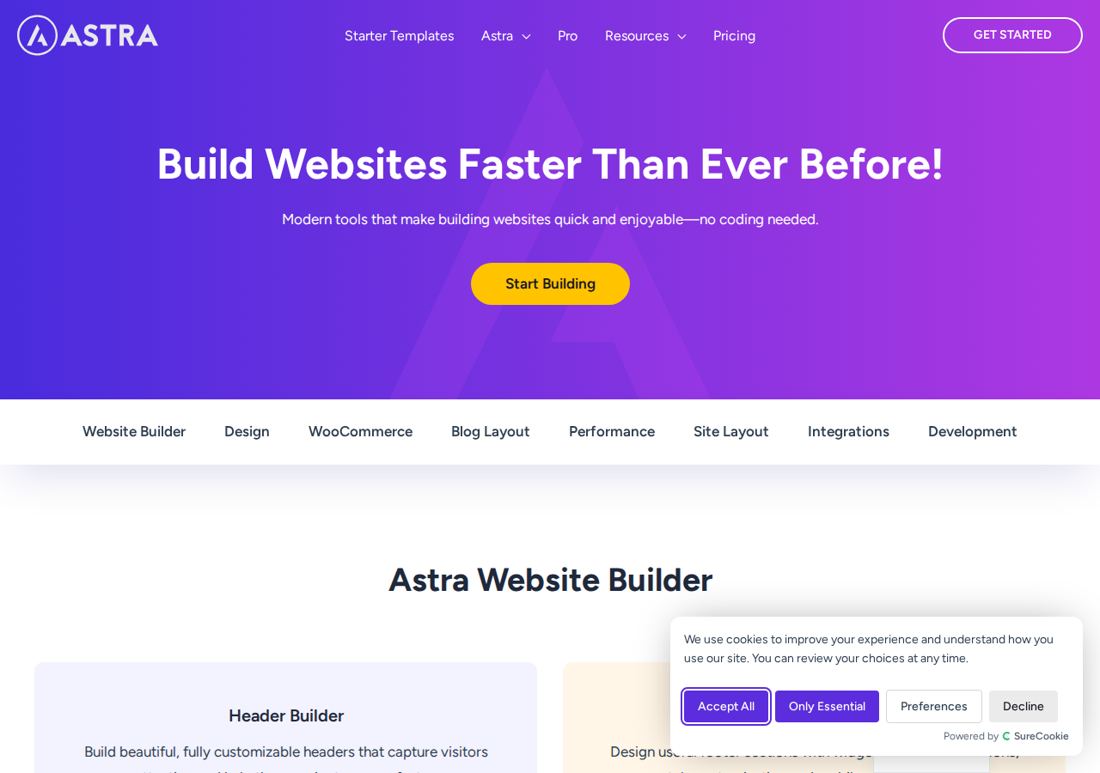
Feature page: lightweight theme, header and footer builder, WooCommerce controls and Spectra blocks.
PRO

Astra Pro and three-site licence

Astra Pro 99 USD first year, renews at 149 USD/yr; three-site tier 199 USD first year, renews at 299 USD

Astra's pricing has one feature worth reading twice: the first year is 99 USD and the renewal is 149. That is the opposite of the discount pattern most WordPress products use, and it means the three-year cost of Astra Pro is closer to 400 USD than to 300. What Pro adds is the part that turns a light theme into a site system - a header and footer builder, WooCommerce layout controls, blog layouts, a mega menu, typography controls and the template library. The free theme already renders every page builder well and loads fast, which is why most buyers start free and upgrade when they hit a header they cannot build.

What the paid tier adds
  • +Header and footer builder with sticky options
  • +WooCommerce layout and product controls
  • +Blog and archive layout options
  • +Mega menu and typography controls
  • +Starter template library and Spectra Pro blocks
  • +Priority support
Licence

One site on Pro, three on the higher tier; the free theme is unlimited.

What it does not change
  • –No page builder inside it - Astra is the theme, the builder is separate
  • –No hosting or caching
Documented from wpastra.com/pricing on 13 November 2026, including the renewal prices shown next to the first-year offer. No licence was purchased.Sources: Astra pricing · Astra features

Screenshot walkthrough

  1. Homepage: positioned as the fastest theme for WordPress, with page-builder compatibility as the second promise.
    1. Homepage: positioned as the fastest theme for WordPress, with page-builder compatibility as the second promise.
  2. Pricing: Astra Pro 99 USD first year, renewing at 149, with three-site and agency tiers plus separate products like SureForms.
    2. Pricing: Astra Pro 99 USD first year, renewing at 149, with three-site and agency tiers plus separate products like SureForms.
  3. Features: theme-level header and footer builder, WooCommerce options, mega menu and the Spectra block library.
    3. Features: theme-level header and footer builder, WooCommerce options, mega menu and the Spectra block library.
  4. Affiliate page: a public programme, which makes this review eligible for affiliate links later.
    4. Affiliate page: a public programme, which makes this review eligible for affiliate links later.

Where to get it

No affiliate program: this links to the official site.

Updates to this page

  • 2026-11-27Price check: the vendor page no longer shows all quoted figures (99, 149, 199, 299) and now lists 496, 687, 149, 79, 70, 449. Verified 2026-11-27 from https://wpastra.com/pricing/; our test snapshot stays as published.
  • 2026-11-26Price check: the vendor page no longer shows all quoted figures (99, 149, 199, 299) and now lists 496, 687, 149, 79, 70, 449. Verified 2026-11-26 from https://wpastra.com/pricing/; our test snapshot stays as published.
  • 2026-11-23Price check: the vendor page no longer shows all quoted figures (99, 149, 199, 299) and now lists 1299, 699, 496, 687, 149, 79. Verified 2026-11-23 from https://wpastra.com/pricing/; our test snapshot stays as published.
  • 2026-11-16Quoted figures still on the vendor page | promotion signals: save X, coupon
  • 2026-11-16Quoted figures still on the vendor page | promotion signals: save X, coupon
  • 2026-11-16Promotion detected on the vendor page: save X, coupon. Checked 2026-11-16; the review text is not affected.
  • 2026-11-15Promotion detected on the vendor page: save X, coupon. Checked 2026-11-15; the review text is not affected.

Reader reviews

Loading reader ratings...

0 comments

Disclosure. This review contains no affiliate links — we are not enrolled in an affiliate programme for this product, although several tools in this category run one. Links point to the official website and cost you nothing extra.

Last updated 2026-11-27. Test conditions and results are documented in the “What we tested” section.

Prices and promotions are re-checked every Monday by an automated check; the last run was 2026-11-27. A change is published only after a person verifies it — see how we test.