
This Airtable review is about the spreadsheet that grew a database engine: 20 USD per seat on Team, 45 on Business, a free plan with 1,000 records per base, and a product that becomes the operational backbone of a small business faster than anyone expects.
Prices are from airtable.com/pricing, read 24 November 2026, USD per seat per month with annual billing. No base was created, so this is a research-based review with no score - the rule is in how we test.
What Airtable is
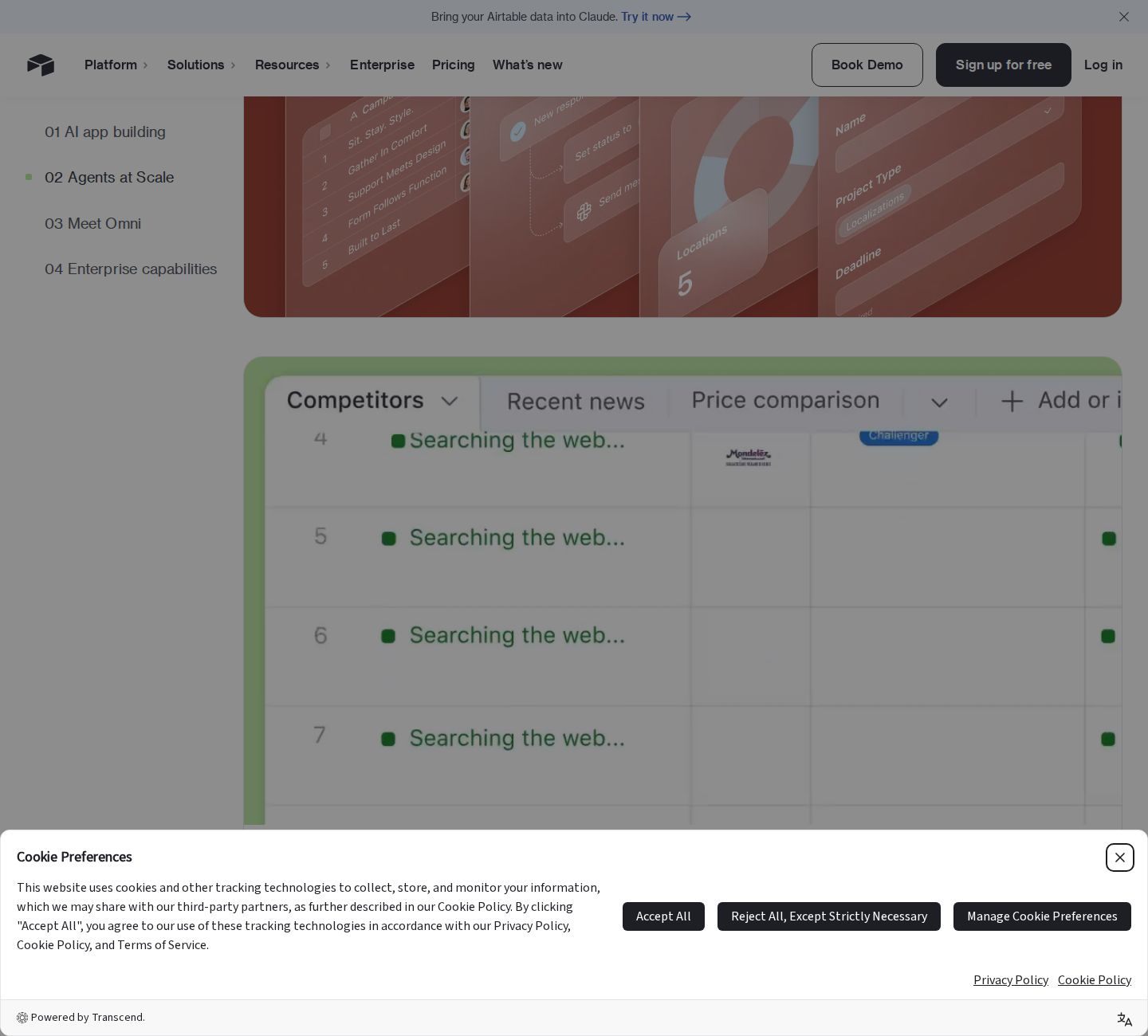
A relational database with a friendly face. Each base is a set of tables; each table has fields of different types - text, select, attachment, link to another table, formula, rollup - and each table can be seen as a grid, a kanban, a calendar, a gallery or a form. Automations trigger on records changing, and interfaces present a curated view to people who should not see the raw grid.
The honest description: it is a database for people who would otherwise use a spreadsheet badly. A client list with linked projects and invoices, an inventory with suppliers and reorder points, a content calendar with assets attached - all things a spreadsheet can technically hold and a database handles without breaking.
Pricing, precisely
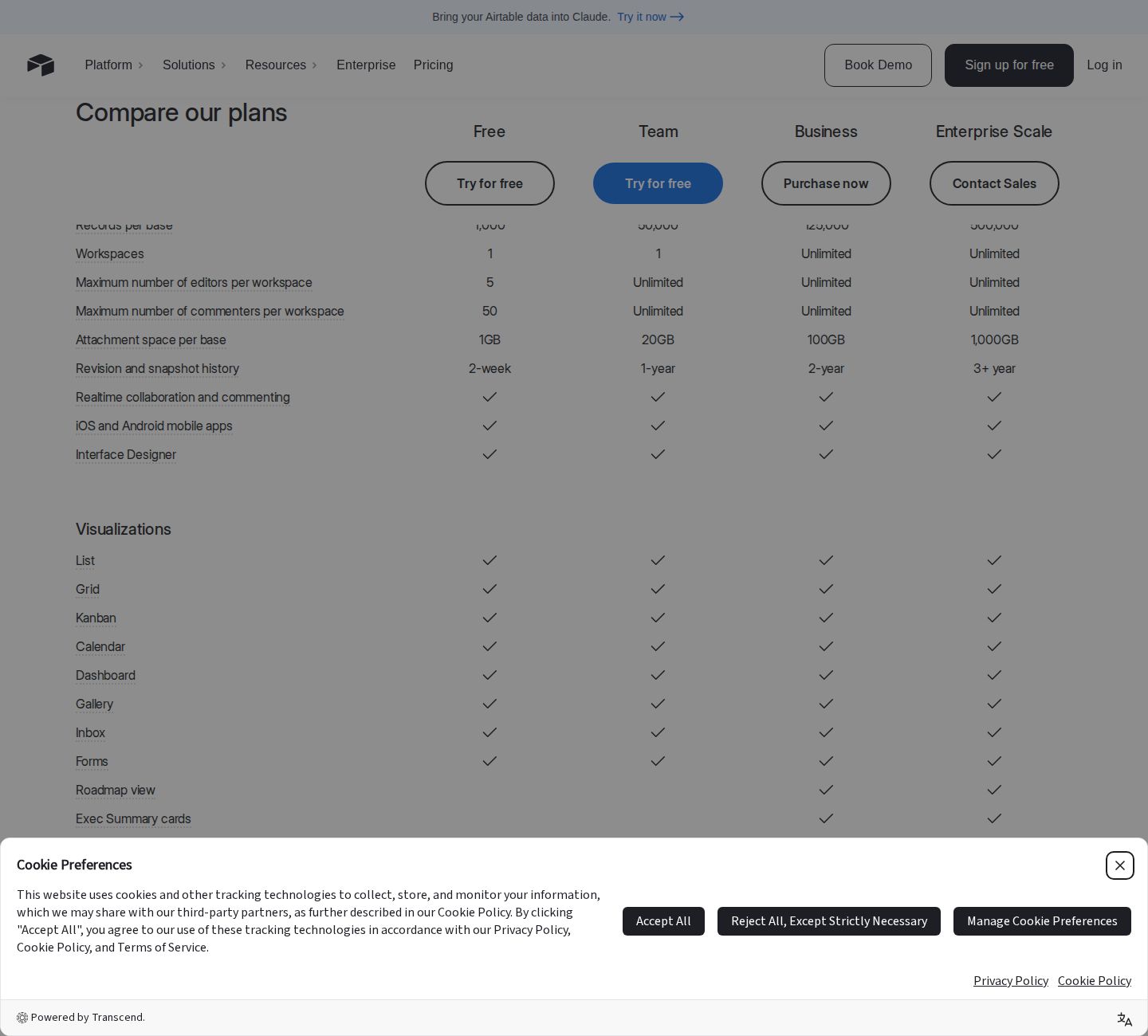
| Plan | Price (annual) | Monthly | Limits |
|---|---|---|---|
| Free | 0 | - | unlimited bases, 1,000 records per base, 1GB attachments |
| Team | 20 USD/seat | 24 USD | 50,000 records per base, 20GB attachments |
| Business | 45 USD/seat | 54 USD | 125,000 records per base, 100GB, advanced admin |
| Enterprise | custom | - | governance, SSO, scale |
The number that decides most purchases is records per base: 1,000 sounds like a lot until a client list with linked orders reaches it in a year, and the jump to 50,000 costs 20 USD per seat. The second is seats: Airtable charges every person who edits, so a five-person team on Team is 100 USD a month - more than most small businesses expect to pay for a database.
What it does well
Linked records. This is the feature that separates it from a spreadsheet: an order links to a client and to products, and a rollup sums the invoice total without a VLOOKUP that breaks when someone sorts a column. For a business running operations on spreadsheets, that change alone is worth the subscription.
Views per audience. The same table becomes a grid for the admin, a kanban for the warehouse, a calendar for the content team and a form for the client - without duplicating data.
Automations. "When status becomes Paid, send an email and create a record in the accounting base" - the kind of rule that replaces a manual step nobody enjoys.
Interfaces. A curated app on top of the base, so a colleague or a client sees three fields and a button rather than 40 columns.
Where it fails
- Per-seat pricing is expensive for a small business, and read-only collaborators are cheaper but not free in the way people assume.
- Automation runs are capped by plan, and a busy base consumes them faster than expected.
- It encourages over-building. A base with forty fields and twelve views is a system nobody maintains, and the flexibility is the trap.
- Reporting is basic compared with a BI tool; charts exist, analysis does not.
- Performance on large bases with many rollups is the most common complaint from long-term users.
How it compares
| Free tier | Entry paid | Unit | Best at | |
|---|---|---|---|---|
| Airtable | 1,000 records per base | 20 USD/seat | per seat | relational data with a friendly UI |
| Notion | individuals, unlimited pages | 9.50 EUR/seat | per seat | documents with light databases |
| Google Sheets | free | about 6 USD/seat | per seat | calculation and familiarity |
| ClickUp | unlimited tasks | 9 USD/user annual | per seat | tasks and project views |
Airtable against Notion is the real decision for a small business: Notion for documents that hold a little data, Airtable for data that people need to work in. Against a spreadsheet, the argument is not features but durability - relationships that survive an edit.
Who should buy it
A business outgrowing spreadsheets. Client list, projects, invoices, inventory - linked, with views per team, at 20 USD a seat.
An agency managing client deliverables. Interfaces plus forms give clients a view without giving them the base.
A small operations team that needs a light CRM without a CRM's price or configuration.
Who should not
A five-person team whose need is mostly task tracking - ClickUp is cheaper and better shaped for that. A business writing long documents: Notion at half the seat price does documents with a database attached. And anyone who will not maintain the structure: a base with forty fields becomes the same mess as the spreadsheet it replaced.
Questions people ask
What happens at 1,000 records per base? The base keeps working and stops accepting new records; the upgrade to Team at 50,000 is 20 USD per seat.
Are viewers free? Read-only collaborators are cheaper than editors, and the exact allowance depends on plan - check before inviting a client list.
Can it replace a CRM? For a small pipeline with custom fields, yes. For forecasting, email sync and pipeline reporting, a real CRM is the better tool.
Do automations cost extra? They are included with monthly run limits per plan; heavy bases hit them.
Is there an API? Yes, a well-documented REST API, which is how most teams connect it to the rest of their stack.
What we have not tested - and will
The checks that would produce a score, all needing a base:
- Build time for a client-projects-invoices structure by someone who has never used Airtable
- Performance with 20,000 records and five rollup fields
- Automation run consumption on a realistic week of order updates
- Interface usability tested with a non-technical client
- Whether the free plan's record cap is hit in a normal first year
- Export to CSV fidelity, including linked records
- Mobile app behaviour for field updates on site
Bottom line
Airtable is the best way to move a small business off spreadsheets that have become load-bearing: 20 USD a seat for 50,000 records, linked tables and views per team, with a free plan to prove the structure first. The price is real and the maintenance is real.
Buy it when data has relationships and people need to work inside it. If the need is documents, Notion; if it is tasks, ClickUp - and if a spreadsheet still works, keep the spreadsheet, because a database you do not maintain is just a slower spreadsheet.
Every vendor link on this site is disclosed in the affiliate disclosure; a commission never changes a score. Our rules are in the editorial policy, and the rest of the reviews are in the review index.
One note on the first base
Build the smallest useful thing: two tables, linked, with one view per person who will use it, and no formula you cannot explain. Bases that grow one field at a time survive; bases designed on a whiteboard in an afternoon are abandoned within a month, and the difference between the two is not the plan but the discipline of adding only what someone asked for.
The pricing question, answered plainly
Twenty dollars a seat is easy to justify against the hours a broken spreadsheet costs in a year, and hard to justify for a team of eight that mostly reads. Start on Free with the real structure, count records and editors for a month, then buy the tier the numbers actually require.
What to do before you subscribe
Take one spreadsheet that causes real pain - the one that breaks when someone sorts it - and rebuild it as two linked tables on the free plan. If the structure works and the records fit, upgrade; if you find yourself wanting five views and three automations in week one, that is a sign the problem is process, not storage, and no plan fixes it.
Sources
All pages read on 24 November 2026:
- Airtable homepage: airtable.com - bases, tables, views, automations and interfaces
- Airtable pricing: airtable.com - Free with unlimited bases and 1,000 records per base, Team 20 USD per seat billed annually (24 monthly) with 50,000 records, Business 45 USD (54 monthly) with 125,000 records, Enterprise custom








Reader reviews
Loading reader ratings...