
This Todoist review is about the tool that does one job and refuses to do others: capture a task, schedule it, get it out of your head. Five euros a month for Pro, eight per user for Business, and a free plan that is genuinely enough for personal use.
Prices are from todoist.com/pricing, read 24 November 2026, EUR as served to us, with annual billing. No account was created, so this is a research-based review with no score - the rule is in how we test.
What Todoist is
A task manager built around fast capture. A keyboard shortcut from anywhere adds a task with natural-language dates - "call the bank friday 10am" becomes a task on Friday at ten - and the interface is a list, not a board, because the product believes lists are how people actually work.
It is deliberately not a project management suite. There are projects and labels, filters and priorities, but no Gantt charts, no workload planning, no documents. That restraint is why people who try it tend to stay: there is nothing to configure and nothing to avoid.
Pricing, precisely
| Plan | Price | Includes |
|---|---|---|
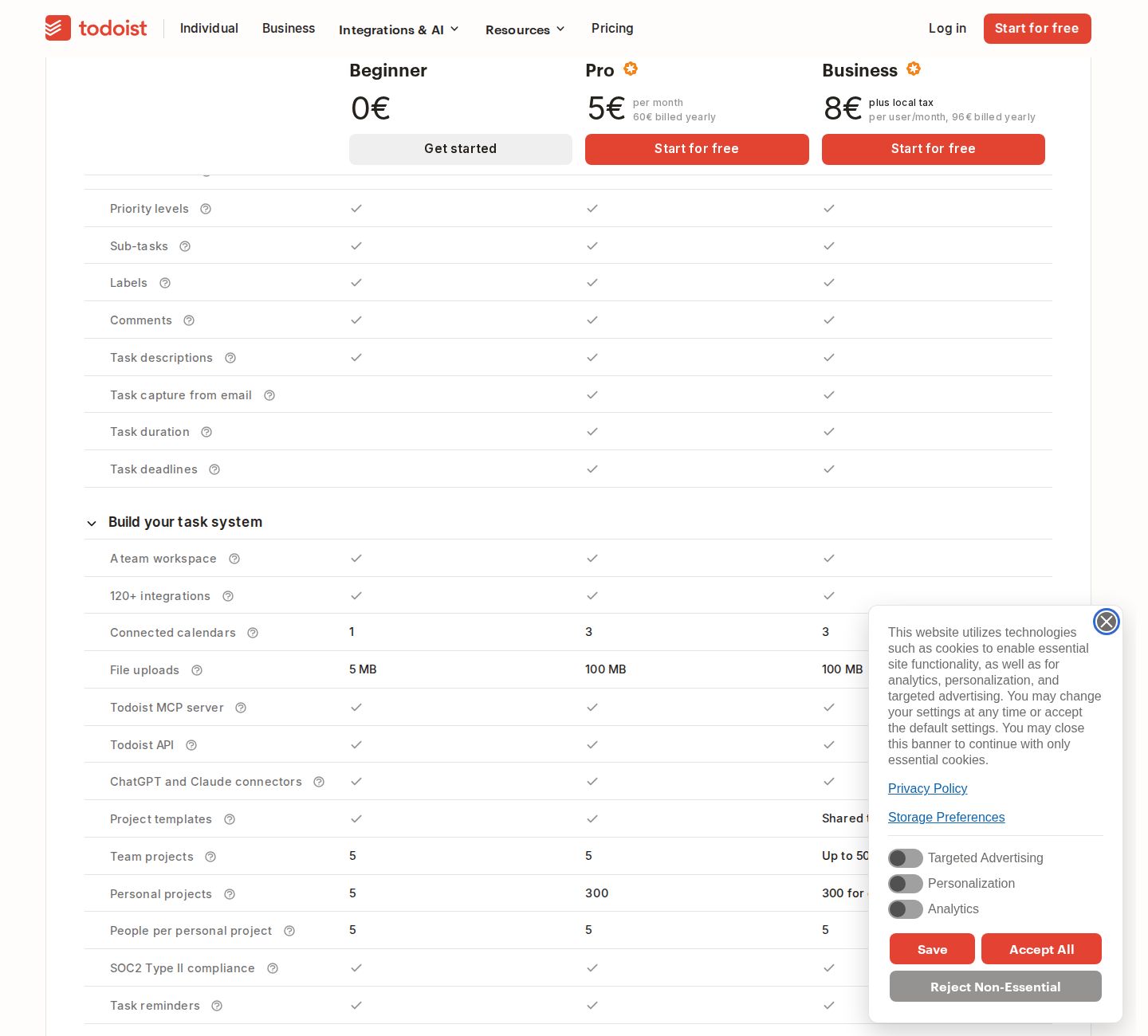
| Beginner | 0 | tasks, recurring tasks, reminders, integrations, API |
| Pro | 5 EUR/mo billed yearly (60 EUR/yr) | 300 projects, calendar and table layouts, durations, 150 filters, full history |
| Business | 8 EUR/user/mo billed yearly (96 EUR/yr) | everything in Pro for each member, shared team workspace |
The free tier is the thing to note: recurring tasks, reminders, calendar and email integrations and API access are not gated. Many competitors put reminders behind a paywall because they are the feature that makes a task manager useful; Todoist gives them away and charges for volume and structure instead.
The Business tier is priced per user at 96 EUR a year, which is a real commitment for a small team - and it is only worth it if the team will actually live in the task list rather than in a chat app. Our experience of small teams is that most do not, and the honest advice is to start with Pro on one account before buying seats.
What it does well
Capture is faster than any competitor. The natural-language parser is the product's quiet advantage: dates, recurring patterns and project names are understood in one line, on desktop and mobile, and the "quick add" works from a keyboard shortcut, a browser extension and an email.
Recurring tasks done properly. "Every second Tuesday", "the last working day of the month" - the patterns people actually need, without creating a calendar event and hoping.
Filters as saved views. A filter like "overdue and not labeled waiting" becomes a view you can pin, which is how a task list becomes a system without becoming a project.
It stays out of the way. No onboarding funnel, no templates to dismiss, no AI nagging. For a tool opened fifteen times a day, that is worth more than features.
Where it fails
- No workload or capacity planning. For a team distributing work, this is the ceiling.
- Collaboration is basic. Sharing projects works; seeing what a colleague is doing this week does not.
- No time tracking, no documents, no client-facing views. It is a list, and it stays a list.
- The AI features are narrow - capture assistance rather than planning - and they do not change the workflow.
- Business pricing per user quickly exceeds the value for a team that mostly needs a shared list.
How it compares
| Free tier | Entry paid | Unit | Best at | |
|---|---|---|---|---|
| Todoist | tasks, reminders, integrations | 5 EUR/mo yearly | per user | fast capture and reliability |
| ClickUp | unlimited tasks, free members | 9 USD/user annual | per seat | breadth and views |
| Things | no free tier | about 10 USD one-off | per device | Apple-only craft |
| Apple Reminders | free | free | - | simplicity, ecosystem lock-in |
The choice is usually Todoist against ClickUp: ClickUp for a team that needs boards, docs and reporting, Todoist for a person or a small team that needs the list to be fast and correct. When the data behind the tasks is the real problem - clients, orders, inventory - Airtable is the tool that holds it, not a task manager.
Who should buy it
A freelancer or solo operator. Five euros a month for the most reliable task list available, with reminders and integrations included at that price.
A small team sharing a list. Pro on one account covers a shared project; Business only if everyone works from their own Todoist daily.
Anyone who has tried five task apps and abandoned them. The failure mode of the others is configuration; Todoist has almost none.
Who should not
A team that needs capacity planning, dependencies or client dashboards - that is Motion or ClickUp. A business that wants tasks inside documents - Notion. And anyone whose team already lives in chat and will not adopt a second inbox.
Questions people ask
Is the free plan enough for one person? Mostly: tasks, recurring tasks, reminders and integrations are included; Pro adds volume, layouts and history.
What does Pro add that matters? 300 projects, calendar and table layouts, task durations, 150 filters and full reporting history.
Is Business priced per user? Yes, 8 EUR per user per month billed yearly - check the seat count before committing a team.
Does it sync reliably? It is one of the product's strengths; offline capture and sync are dependable on mobile.
Can I import from another tool? Yes, from Todoist's own formats and common competitors; the mapping of recurring tasks is the part to check.
What we have not tested - and will
The checks that would produce a score, all needing an account:
- Natural-language parsing accuracy across 50 real tasks, including relative dates
- Recurring patterns for "last working day" and "every other Friday" over a month
- Sync behaviour when adding tasks offline on mobile and coming back online
- Filter complexity limits at the Pro tier
- Whether the Business workspace is usable by a team that will not open it daily
- Notification reliability on iOS and Android, which is where task managers fail silently
- Export completeness, including completed tasks and history
Bottom line
Todoist is the best pure task manager for a small business: five euros a month for a fast, reliable list with reminders and integrations, and a free tier that is not a demo. The limits are deliberate - no workload planning, no documents, thin collaboration.
Buy it if the problem is remembering and scheduling. Buy ClickUp or Motion if the problem is coordinating a team or distributing capacity - and do not expect Todoist to become those tools, because its restraint is the reason it works.
Every vendor link on this site is disclosed in the affiliate disclosure; a commission never changes a score. Our rules are in the editorial policy, and the rest of the reviews are in the review index.
One note on why simpler tools win
The pattern across this category is that people adopt the tool they can open twenty times a day without thinking. Todoist's advantage is not a feature competitors lack - it is that adding a task takes three seconds and never produces a dialog. If a team evaluates task managers by feature lists, it will choose something larger and then use ten percent of it; if it evaluates by how fast the list grows during a normal week, the answer is usually the small one.
How to judge it in a week
Use the free plan for seven days and count two things: tasks added per day, and tasks completed. If the first number is small, you do not have a task management problem and the subscription is unnecessary. If tasks pile up and nothing closes, the issue is priorities rather than the tool - and that is what Pro's filters and layouts are for.
Sources
All pages read on 24 November 2026:
- Todoist homepage: todoist.com - natural-language capture, recurring tasks, integrations, MCP server
- Todoist pricing: todoist.com - Beginner free with tasks and reminders, Pro 5 EUR per month billed yearly (60 EUR per year), Business 8 EUR per user per month billed yearly (96 EUR per year)








Reader reviews
Loading reader ratings...