Skip to content
VerdictMill
HeyGen logoHeyGenResearch-basedAI video & avatars

HeyGen review: avatar video that looks like a studio shoot

By Milan Pasic•Published 2026-11-13•Updated 2026-11-27
Verdict

HeyGen turns a script into a talking-head video with an avatar and a cloned voice - free to try, 29 USD a month to publish, 149 USD for teams - and the quality gap to the cheap end of the market is obvious.

No score: this page is research-based and has not been hands-on tested yet.

Research-based · not hands-on tested
Visit HeyGenLinks to the official site
29
The number that matters

USD a month on Creator, the plan that makes avatar video cheap enough to produce at volume

Best for

It fits teams that publish repetitive video: onboarding, product explainers, localisation into five languages, sales outreach at volume.

Not for

Your video is cinematography - real people in real places, where the camera work is the product.

Pricing

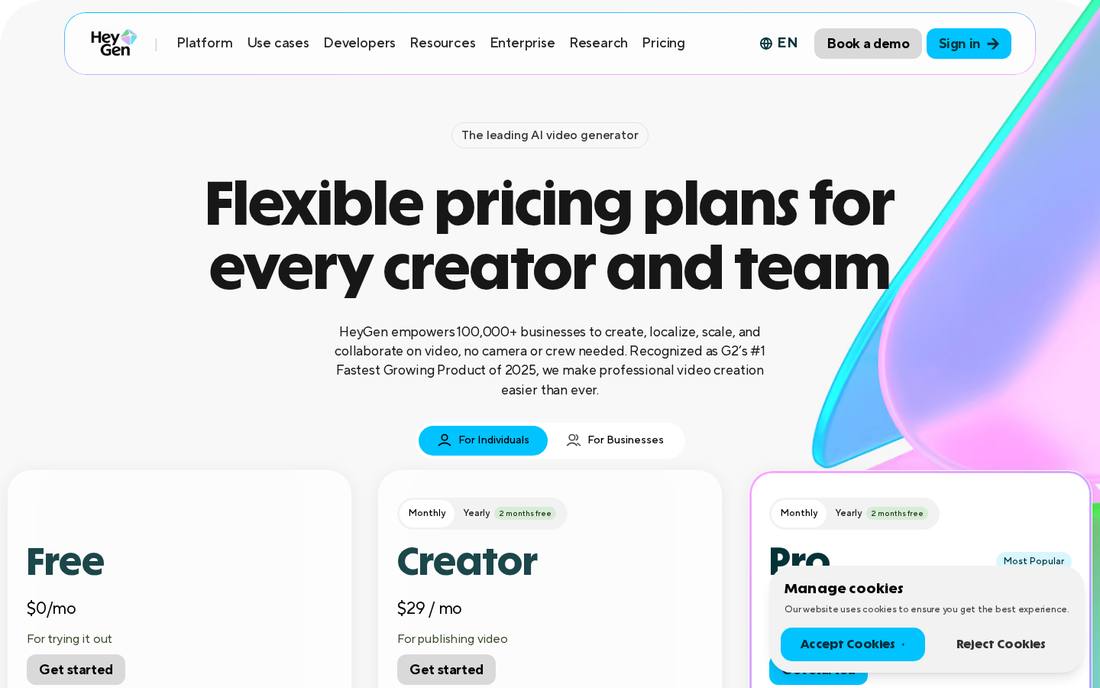
Free; Creator 29 USD/mo; Pro 49 USD/mo; Business 149 USD/mo, extra seats 20 USD/mo

Main limitation

Micro-expression and hands. Avatars hold a neutral, pleasant expression well and improvise badly; gestures repeat, and the hands are the giveaway at the edges of frame.

Vendor artwork from heygen.com. Screenshots were captured by us on 13 November 2026.

Current offers

No current offer for HeyGen. We checked the vendor's pricing page on 2026-11-13 and found no public discount, coupon or promotion. When one appears, we add it here with the date we verified it.

What we tested

Product
HeyGen
Type
Research-based · not hands-on tested

How it compares

HeyGenSynthesiaInVideoFliki
Entry paid price29 USD/mo19 USD/mo20 EUR/seat/mo24 EUR/user/mo
Free planyes, watermarked500 creditsyes, limitedcredits, watermark
Core strengthtalking-head avatarscorporate training videoprompt-to-videotext to video with voices
Custom avataryes, own footageyes, paidnolimited stock avatars
Affiliate programmeyesyesyesyes

Prices read from vendor pages on 13 November 2026 in the currency each page displayed. Synthesia and InVideo show introductory first-month prices, so the renewal figure is quoted.

HeyGen is the product most people picture when they hear "AI avatar video". This HeyGen review is about the part the demo reel does not show: how an avatar holds up over a three-minute script, what the credits actually buy, and why a company that films once a quarter may not need this at all.

What HeyGen is

A generator of talking-head video. You write a script, choose an avatar and a voice, and HeyGen renders a person speaking it. Avatars come in two kinds: stock avatars licensed from real presenters, and a custom avatar cloned from footage you record yourself. Voices can be stock or cloned, and the two combine - your face, your voice, a script you did not have to perform.

Around that sit templates for the formats businesses actually publish: product explainers, training modules, localisation into other languages, and short social cuts. There is an API for generating video at volume, which is where the product becomes infrastructure rather than a tool.

What you see before you sign up

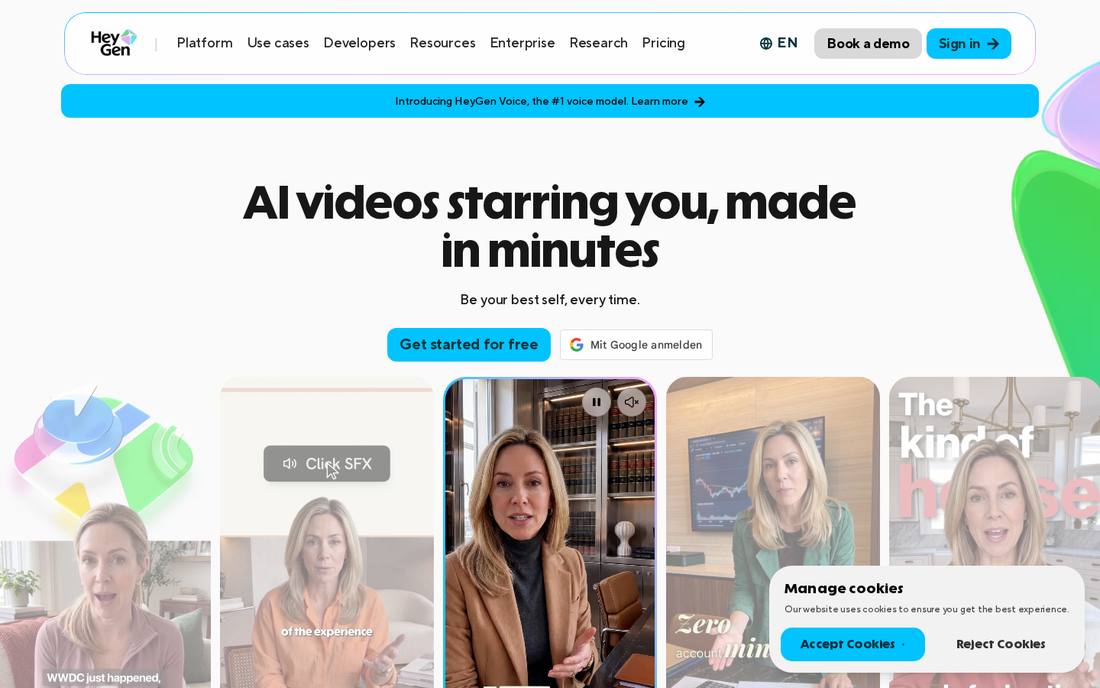
The homepage leads with the output, not the technology, which is the right call: the first thing you see is a presenter looking at camera, and the question in your head is whether that could be your company's video. The pricing page is a four-tier ladder with a yearly toggle advertising two months free, and the tiers differ mainly in credits, length and seats.

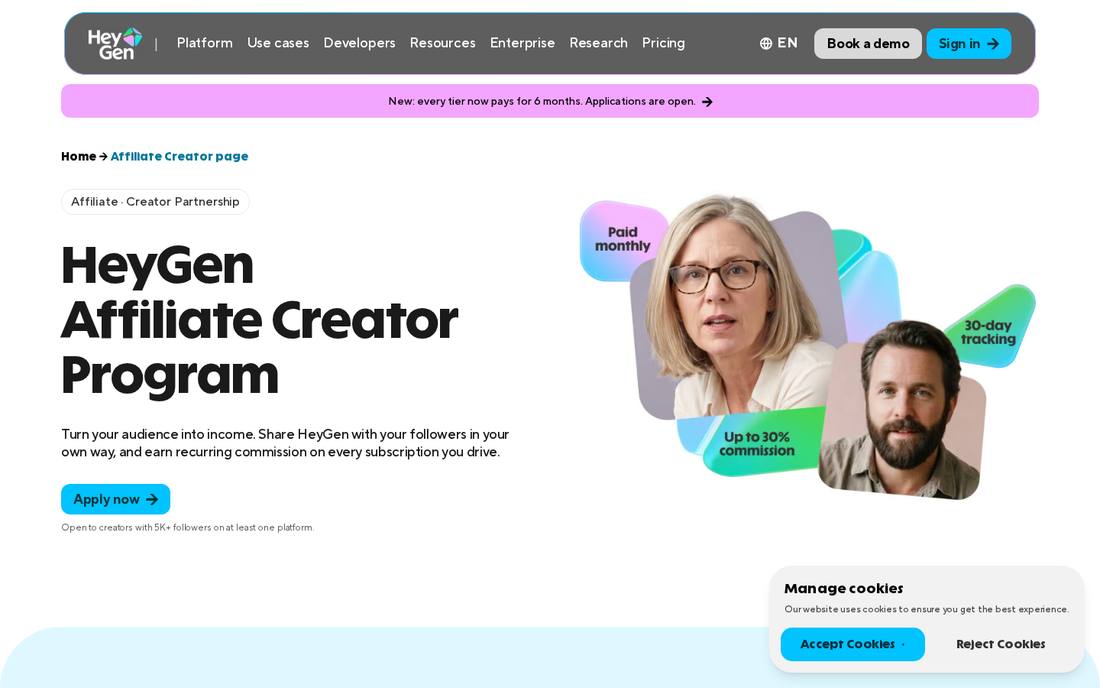
The affiliate page is public, and this review currently carries no affiliate link because we have not been enrolled - the affiliate disclosure explains how that is marked when it changes.

What the credits buy

HeyGen prices in credits, and credits map to rendered seconds rather than finished videos. A three-minute script is roughly 180 seconds of output regardless of how many renders it took to get right, and getting avatar video right usually takes two or three passes - a mispronounced word, an awkward pause, a gesture that lands wrong. Budget three renders per finished minute and the credit allowance stops looking generous.

That arithmetic is the single most useful thing to do before choosing a tier. A marketing team publishing four two-minute videos a month is producing 480 seconds of finished video and consuming closer to 1,500 credited seconds. A solo creator publishing weekly sits comfortably on Creator; a team of four sharing one account does not.

Where it fails

  • Micro-expression and hands. Avatars hold a neutral, pleasant expression well and improvise badly; gestures repeat, and the hands are the giveaway at the edges of frame.
  • Pronunciation. Product names and acronyms need phonetic spelling, exactly as with any text-to-speech engine.
  • Long scripts drift. Past about four minutes the delivery flattens, and viewers notice the rhythm before they notice the lips.
  • Custom avatar capture is a studio day. Lighting, wardrobe and framing have to match the footage you will cut it into, or the joins show.
  • Emotion is narrow. Warm authority is convincing; sarcasm, urgency and comedy are not.

Who it is for, and who should skip it

It fits teams that publish repetitive video: onboarding, product explainers, localisation into five languages, sales outreach at volume. It fits a founder who cannot film every update but can write one. It fits an agency producing the same format for many clients.

Skip it if your video is cinematography - real people in real places, where the camera work is the product. Skip it if you publish twice a year, because the credit floor is not worth it. And skip it if your audience is highly technical and will spot an avatar in the first two seconds; in developer marketing, the tell costs more credibility than the production saves.

How it compares with the other four

Against Synthesia, HeyGen is the more consumer-friendly product with the stronger avatar demo, while Synthesia is built for corporate training and governance. Against InVideo and Fliki, the difference is the unit of output: those assemble a video from stock footage and narration, HeyGen generates a person. Against Pictory, which turns long recordings into short clips, HeyGen creates footage that never existed.

The category comparison is on /category/ai-video, and the procedure behind a future score is in how we test.

The economics against filming

A half-day studio shoot for a three-minute explainer costs more than a year of Pro in most markets, once you count the presenter, the space and the edit. That comparison is HeyGen's whole business case, and it holds as long as the video does not need to be good in a way only a human can be good - timing, warmth, a joke that lands.

The honest way to price it is per finished minute. Take your monthly tier cost, divide by the minutes you actually publish, and add the editing time you still spend on captions, music and cutting between renders. Teams that do this discover the break-even is around two videos a month; below that, filming on a phone is cheaper and better, above it the avatar wins on consistency.

Localisation is the real unlock

Generating the same script in six languages with the same face and voice is not a feature anyone asks for by name, and it is the reason most companies keep the subscription. Re-recording a training module in German used to mean a new presenter or a dub that never quite matches; now it is a render queue.

The limit is cultural rather than technical. A script translated word for word reads as translated, and an avatar speaking stiff German is worse than a human speaking warm German. Budget for a native editor on each language, and treat the avatar as the performance layer rather than the whole localisation.

What happens to your footage

A custom avatar requires recording yourself, which raises the question every legal team asks: where does that footage live, who can use it, and how do you delete it. The answer is in the vendor's terms, not the pricing page, and it is worth reading before the shoot rather than after. Consent from anyone appearing in the footage is your responsibility, and a cloned voice or face used after someone leaves a company is exactly the kind of dispute a contract should have settled in advance.

A note on the free plan

The free tier is a test drive with a watermark, and the watermark is the honest part: it lets you judge lip-sync and voice quality on your own script without paying, and it guarantees you will not publish from it. That is a fair trade for both sides, and it means the only question worth answering on the free plan is whether the avatar is good enough for your audience. Everything else - credits, length, seats - is a pricing question you answer once the answer to that is yes.

Who on the team actually uses it

In practice the buyer and the user are different people. Marketing signs the contract, and the person who ends up in the tool is whoever writes the scripts - usually one person, usually not a video editor. That is the strongest argument for HeyGen and the weakest: it removes the production bottleneck, and it also removes the review step that used to catch a bad script before it became a video.

What we have not tested - and will

Research-based review: public pages plus our own captures, no account. Open questions:

  • How many credits a two-minute script consumes across three renders
  • Lip-sync accuracy on a 40-term technical script
  • Whether a custom avatar survives being cut beside real footage without a visible join
  • Render time at Pro versus Business volume
  • How the API handles 50 videos in a batch

Bottom line

HeyGen is the best-known name in avatar video for a reason: the output is good enough that the question stops being "is that an avatar?" and becomes "does this script deserve a video?". Buy Creator to publish, Pro to build a custom avatar, Business when more than one person needs it.

If your job is training video at scale with governance, look at Synthesia. If your job is assembling stock footage into a narrated clip, look at InVideo or Fliki. HeyGen's specific promise is a person on camera without a camera, and on that it delivers.

Sources

Our verdict

Updated 2026-11-27
Buy it if
You need talking-head video at volume without filming: script in, avatar and cloned voice out, 29 USD a month on Creator. It is the cheapest credible way to produce the same presenter across dozens of clips.
Skip it if
You need full-body motion, real gestures or a face that has to be yours on camera in a natural way. The avatar is a presenter, not a replacement for filming, and long scripts expose the seams.
What we would do
Clone your voice, render one 90-second script, and watch it twice before subscribing. If you notice the mouth shapes on the second viewing, your audience will notice on the first.

— Milan Pasic, editor. This is an editorial judgement, not a summary of the text above; the score follows the published method.

Milan Pasic

Editor. Writes the tests, runs the comparisons and publishes the numbers — including the ones that make a product look worse. Reviews are written and checked by a person, and every score follows the published method.

About · Editorial policy · LinkedIn

Related reviews

How it compares in this category

All AI video & avatars reviews →
ProductScorePrice (1 site)TestedVerdict
Fliki logoFliki—Standard 24 EUR/user/monot testedFliki turns a script or a blog post into a narrated video with stock footage and one of the largest voice libraries in this category - 24 EUR a user per month for 180 credits and videos up to 15 minutes.
InVideo logoInVideo—Starter 20 EUR/seat/mo, or 10 EUR/seat/mo billed yearlynot testedInVideo turns a text prompt into a narrated video assembled from stock footage - 10 EUR per seat a month billed yearly - which makes it the cheapest way to publish volume, and the one where every video looks slightly familiar.
Opus Clip logoOpus Clip—29 USD/mo or about 14.50 USD/mo yearlynot testedOpus Clip does one job deeply - it ranks the moments in a long recording and cuts them into captioned vertical clips - for 15 USD a month with no annual commitment on the entry tier.
Pictory logoPictory—12.50 USD/mo billed annuallynot testedPictory is the reverse of the other AI video tools: you bring footage you already recorded, and it finds the quotable moments, cuts them into short clips and adds captions - from 12.50 USD a month billed annually, with 24,000 credits.
Synthesia logoSynthesia—79 EUR a month, or 588 EUR a yearnot testedSynthesia turns a script into a presenter-led video in 140+ languages, with a free tier of 500 credits and paid plans from 19 EUR a month, or 144 EUR a year with four months free - the corporate counterpart to HeyGen's creator focus.
VEED logoVEED—11 EUR/user/mo billed yearlynot testedVEED is the cheapest credible browser editor for small teams: 11 EUR a month billed yearly for 1080p exports, subtitles, stock footage and a brand kit, with AI features that are useful rather than decorative.

Same test rig, same article, default settings. Scores are ours; prices are the vendor's list price on the date each page was written.

Screenshots

Pricing page, 13 Nov 2026: Free, Creator 29 USD, Pro 49 USD and Business 149 USD, with a yearly toggle offering two months free.
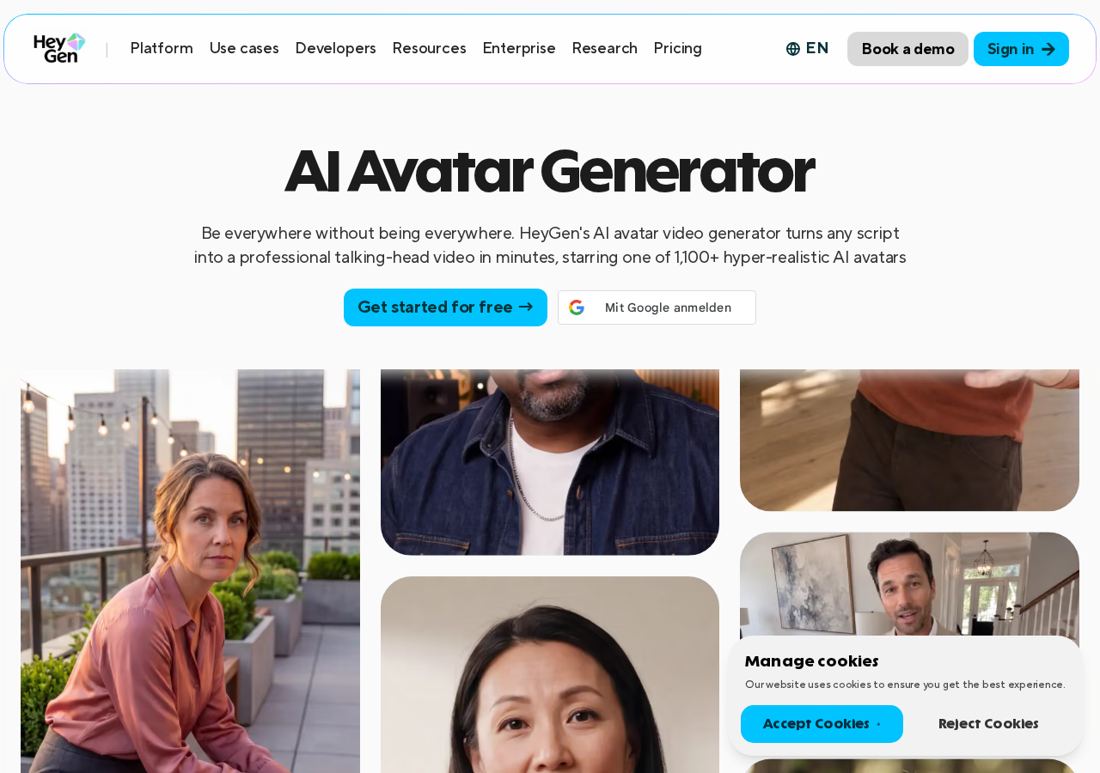
Feature page: avatars, voice cloning, templates and the API, sold as one production pipeline.
PRO

HeyGen Free, Creator, Pro and Business

Free; Creator 29 USD/mo; Pro 49 USD/mo; Business 149 USD/mo, extra seats 20 USD/mo

HeyGen's ladder is volume, not features: every tier produces avatar video, and the paid tiers differ in credits, video length, watermark removal and how many custom avatars you can hold. Creator at 29 USD is the first tier a publisher can use, because it removes the watermark and allows commercial use. Pro at 49 USD roughly doubles the credits and unlocks the higher-fidelity rendering that makes a custom avatar worth making. Business at 149 USD adds seats at 20 USD each, which is the tier a marketing team ends up on and the tier where the per-video cost finally drops below the cost of filming. The yearly toggle shows two months free, which is the honest annual discount to compare against monthly.

What the paid tier adds
  • +Watermark removal and commercial rights on paid tiers
  • +Custom avatar from your own footage
  • +Voice cloning in your own voice
  • +Longer videos and higher credit allowances
  • +Team seats and admin on Business
  • +API access for generating videos at volume
Licence

Per account with monthly credits; each custom avatar is stored against the account.

What it does not change
  • –No editing timeline to rival a video editor - HeyGen generates clips, it does not cut a film
  • –No guarantee that a custom avatar survives a change of lighting or wardrobe
Documented from heygen.com/pricing on 13 November 2026, including the yearly toggle that advertises two months free. No paid account was created.Sources: HeyGen pricing · HeyGen features

Screenshot walkthrough

  1. Homepage: sold as avatar video for business - the demo reel is the product, and the first frame is a person talking to camera.
    1. Homepage: sold as avatar video for business - the demo reel is the product, and the first frame is a person talking to camera.
  2. Pricing: Free for testing, Creator 29 USD/mo, Pro 49 USD/mo, Business 149 USD/mo plus 20 USD per extra seat, yearly billing adds two months free.
    2. Pricing: Free for testing, Creator 29 USD/mo, Pro 49 USD/mo, Business 149 USD/mo plus 20 USD per extra seat, yearly billing adds two months free.
  3. Features: stock avatars, a custom avatar from your own footage, voice cloning, and an API for generating videos at volume.
    3. Features: stock avatars, a custom avatar from your own footage, voice cloning, and an API for generating videos at volume.
  4. Affiliate page: a public programme, which is why this review is eligible for affiliate links once we are enrolled.
    4. Affiliate page: a public programme, which is why this review is eligible for affiliate links once we are enrolled.

Where to get it

No affiliate program: this links to the official site.

Reader reviews

Loading reader ratings...

0 comments

Disclosure. This review contains no affiliate links — we are not enrolled in an affiliate programme for this product, although several tools in this category run one. Links point to the official website and cost you nothing extra.

Last updated 2026-11-27. Test conditions and results are documented in the “What we tested” section.

Prices and promotions are re-checked every Monday by an automated check; the last run was 2026-11-27. A change is published only after a person verifies it — see how we test.