

Rank Math is a WordPress SEO plugin with an unusually generous free tier and a paid tier that is priced by the number of client sites rather than by features. This Rank Math review documents what the free version includes, where it stops, what the paid plans add, and what we have not yet measured ourselves.
What this review is, and what it is not
This is a research-based review. It is built from the vendor's own documentation, pricing page and feature comparison, all read on 13 November 2026. We ran the free build through the same test rig as the other five plugins, so the numbers on this page are ours.
What that means in practice: everything below about features and prices is checkable at the vendor's site. The PRO tier is documented, not tested - we do not own a licence for it, and the free version is where most readers start anyway. Anything about performance, schema validity or behaviour under load is explicitly left open until we test it. Our test plan is at the end of this page.
What Rank Math is
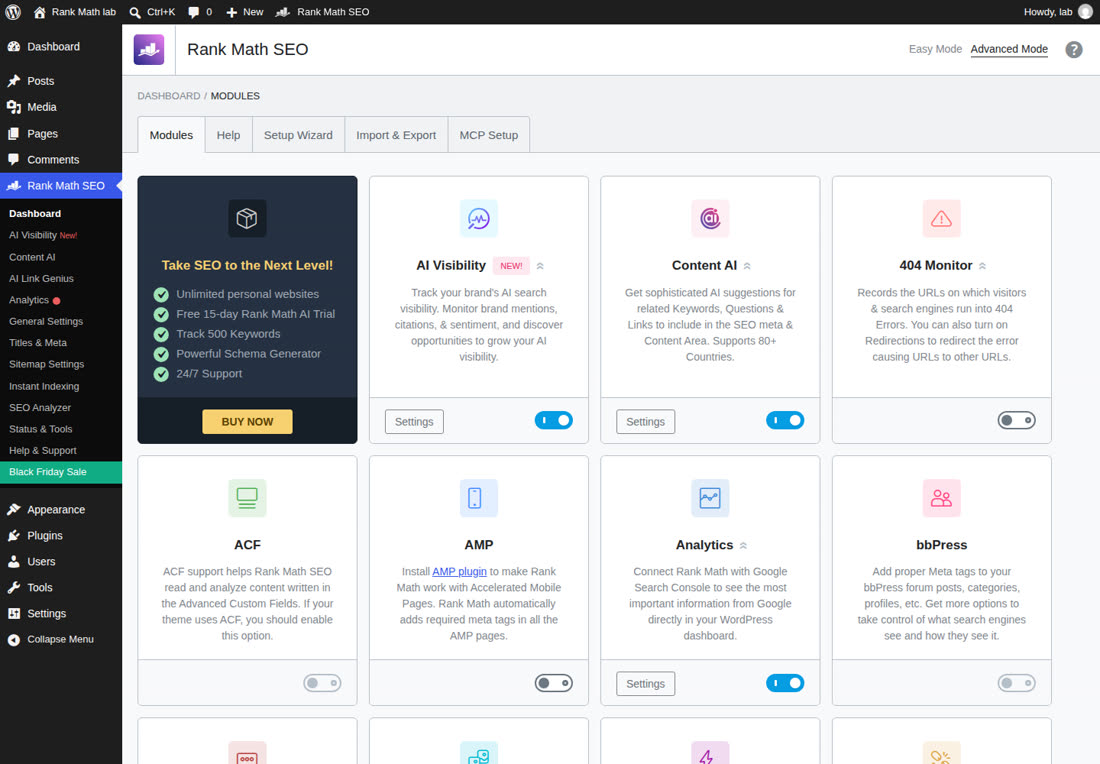
A plugin for WordPress that bundles the work usually split between four or five separate plugins: titles and meta tags, XML sitemaps, schema markup, redirects, a 404 monitor, Search Console data and an on-page analysis checklist. It ships as 15+ modules that you enable individually, and it runs on both the block editor and the classic editor.
The vendor states 4 million+ users. That is a vendor figure we have not verified, and it does not tell you much beyond the plugin being widely installed.
Integration points that matter for a small business: Google Search Console, Google Analytics 4, and one-click importers from Yoast SEO, All in One SEO, SEOPress and the Redirection plugin. Migration is the moment most people evaluate this plugin, so the importers are not a side feature.
The free version is not a demo
Most freemium plugins put the useful part behind the paywall and the free version behind a banner. Rank Math inverts that: the three modules that actually break sites when they are wrong - schema, sitemaps and redirects - are in the free version, along with the on-page analysis and Search Console data.
Included at no cost, according to the vendor comparison read on 13 November 2026:
- Schema generator with 18 predefined schema types, including Article, Product, FAQ, HowTo, Recipe, Local Business and Software Application
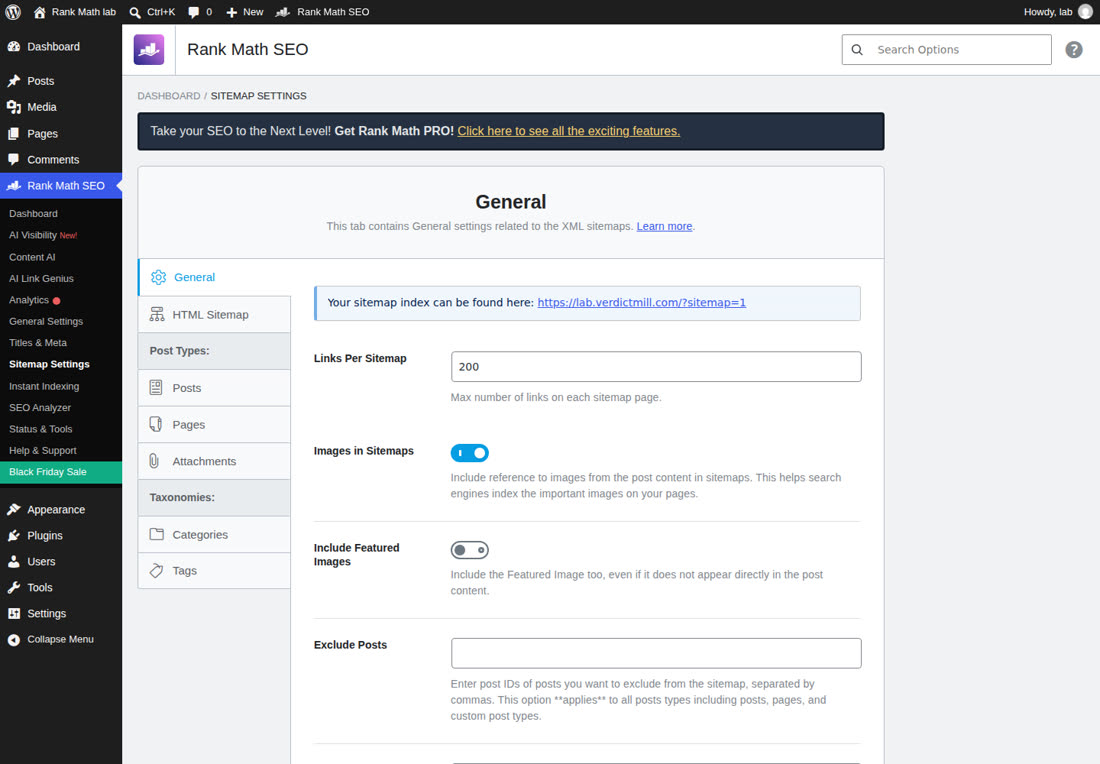
- XML sitemaps for posts, pages and custom post types, updated automatically
- Redirection manager with 301, 302, 307, 410 and 451 types, plus automatic redirects when a post slug changes
- 404 monitor, in its basic form
- 30+ on-page SEO checks with a score, warnings and failed tests
- Google Search Console integration inside the WordPress admin
- Titles, meta descriptions, robots meta, canonicals, Open Graph and Twitter cards
- Bulk editing of titles and descriptions
- Importers from Yoast, AIOSEO, SEOPress and Redirection
- Automated image SEO options (alt and title handling)
- robots.txt editor and an llms.txt generator
For a single site that does not sell local services, that list covers the whole job. The honest test of a free SEO plugin is whether you can run a site for a year on it without buying anything. On capability, you can.
Where the free version stops
The paid plans are not about removing banners. They gate specific modules, and some of those gates matter more than others.
| Capability | Free | Paid (PRO / Business / Agency) |
|---|---|---|
| Predefined schema types | 18 | 18 plus 6 extra types, custom schema builder, 840+ types supported |
| XML sitemaps | Posts, pages, custom post types | Adds News, Video and Image sitemaps |
| Redirects | 301, 302, 307, 410, 451 | Adds regex support, .htaccess sync, CSV import and export |
| 404 monitor | Basic log | Advanced monitor with export |
| Keyword rank tracking | Not included | Included, limit depends on plan |
| Local SEO, multi-location | Not included | Included |
| WooCommerce and EDD SEO | Not included | Included |
| Google Search Console data | Included | Adds longer history, configurable fetch frequency and email reports |
| Content AI | Trial only | Separate subscription |
| Support | Community | 24/7 priority support on paid plans |
The three gates that change a buying decision:
- Rank tracking. If you want to see positions inside WordPress, the free version cannot do it and you need either a paid plan or a second tool. This is the single most common reason to upgrade.
- Local SEO. A local business with more than one location or a service-area setup needs the paid tier. The free version has Local Business schema, but not the local module.
- Advanced redirects. A migration with a few hundred URLs, or regex rules, needs the paid redirect module. A site with a handful of redirects does not.
Two gates are easier to work around: News sitemaps matter only if you publish news; the extra schema types matter only if your markup is not covered by the 18.
Pricing, read carefully
Rank Math prices by client websites and tracked keywords, not by features. All plans below are billed annually and quoted ex VAT, at the list price shown on 13 November 2026. A Black Friday discount of roughly 37-42% was active on that date; the discounted figure is not the renewal price, so we quote the list price instead.
| Plan | Client sites | Tracked keywords | List price |
|---|---|---|---|
| PRO | 1 site (single licence) | Limited by plan | Below Business |
| Business | 100 sites | 10,000 | 27.99 EUR / 27.99 USD per month, billed annually |
| Agency | 500 sites | 50,000 | 64.99 EUR / 64.99 USD per month, billed annually |
Notes that affect the real cost:
- The Business plan renews at the same list price every year; the promotional price applies to the first term only.
- VAT is added at checkout for EU buyers, so the effective monthly cost is higher than the headline figure.
- Keywords are counted across all client websites on the licence, not per site.
- Content AI is a separate subscription, not part of the SEO plugin plans.
- The vendor states a 30-day money-back guarantee.
For one site with no need for rank tracking, the free version costs nothing and the paid plans are hard to justify. For a freelancer managing a dozen client sites who wants rank tracking and local SEO in one dashboard, the Business plan is the tier that makes sense, and the 100-site limit is not the constraint - the keyword limit is.
Module sprawl is the real cost of the free tier
Rank Math is modular, and every module you enable adds admin screens, database options and, depending on the module, front-end requests or cron jobs. The vendor markets the plugin as performance-conscious, and we have no reason to doubt the intent, but we have not measured the page-weight or query cost of a default install versus a stripped one.
Until we do, treat this as an open question rather than a claim in either direction. A practical habit that costs nothing: after setup, open the modules screen and switch off everything you do not use - typically Content AI, Analytics if you already run GA4, Role Manager, and the image SEO module if your theme handles alt text.
Migrating from Yoast, AIOSEO or SEOPress
The importers are one click and they cover titles, meta descriptions, robots settings, social settings and schema. What they generally do not carry over is history: no rank tracking history, no redirect log, and some plugin-specific settings that have no equivalent.
Two precautions we would take on any migration, and will follow in our own test:
- Run the import on a staging copy first, then diff the sitemap against the live one. Any URL that disappears from the sitemap is a problem you want to find before Google does.
- Export the existing redirects to CSV before switching plugins, so the rules can be re-imported even if the importer misses them.
Where it may disappoint
- Local business owners. Local SEO is paid, and the free Local Business schema is not the same as the local module.
- News publishers. News sitemaps are paid, and Google News eligibility depends on them.
- Sites with heavy redirect needs. Regex and .htaccess sync are paid; a large migration can end up carrying a subscription for one feature.
- Anyone who wants a score they can trust without context. The on-page score is a checklist, not a prediction of rankings. A 100 score on a page nobody searches for is still a page nobody searches for.
- Agencies on a tight budget. Pricing scales with client sites and keywords, and the jump from single site to 100 sites is steep for a two-person shop.
Alternatives, on the axes that matter
Comparing SEO plugins by feature lists is a waste of time; almost every list is complete. Compare them on four axes instead: how many schema types are free, which redirect types are free, which sitemap variants are free, and whether local SEO is free. Those are the four places where the three big plugins diverge, and where a paid upgrade is actually triggered.
Yoast SEO and All in One SEO are the usual alternatives, and both have free tiers that most sites can live with. The right question is not which plugin has more features, but which one gates the feature your site cannot work without.
What you see in the admin
The plugin installs a top-level menu with a dashboard, and the dashboard is a list of modules you switch on or off: titles and meta, sitemaps, schema, redirects, 404 monitor, local SEO, WooCommerce, rank tracker, content AI, image SEO, role manager, analytics. Fifteen or so switches, each with its own settings screen. That is more surface area than any other plugin here, and it is the main reason people either love Rank Math or bounce off it in the first ten minutes.
First run opens a setup wizard that asks about site type, social profiles, analytics and Search Console. Unlike Yoast's wizard, skipping it does not leave the metadata empty: our test post had a description and Open Graph tags without completing anything.
On the post editor the Rank Math panel shows the focus keyword, a score out of 100 with a checklist, a Google preview, and tabs for social, schema and advanced settings. The schema tab is where the plugin's biggest paid advantage lives - arbitrary types, custom templates, and per-page overrides.
How the core features behave
Metadata is generated from templates you edit once per content type, with a snippet preview that shows truncation live. Schema is the deepest implementation of the five when you pay: eighteen predefined types free, custom schema building and additional types in PRO. Sitemaps are per content type and switch off individually, which is handy when a custom post type should never be indexed. Redirects work in the free build, and the redirect type coverage (301, 302, 307, 410, 451) is wider than most competitors' free modules. The 404 monitor is basic free, advanced with export in PRO.
Rank tracking is the paid feature people actually upgrade for, and Content AI is a separate subscription again - worth knowing before you assume the SEO plan includes it.
Who it is for, and who should skip it
It fits the site owner who wants the most features without paying: eighteen schema types, redirects, sitemaps and on-page analysis for nothing. It fits an agency that wants rank tracking and client-site management in one dashboard, priced by client sites instead of per seat. It fits schema-heavy sites - recipes, courses, products, events - because the schema builder is the most flexible here.
Skip it if you want three settings screens and nothing else, if you dislike dashboards that advertise the paid tier on every page, or if you only need metadata and a sitemap - Slim SEO or The SEO Framework will do that with less surface area.
Moving from another SEO plugin
The importer covers Yoast, All in One SEO, SEOPress and the Redirection plugin, and it carries titles, descriptions, social settings, schema settings and redirect rules. Redirects coming from the Redirection plugin import as rules rather than links, which is the detail most migrations get wrong. Deactivate the old plugin before activating Rank Math, then check one page's source for duplicated meta tags.
Common questions
Is redirects really free? Yes, with the standard redirect types. Regex, .htaccess sync and CSV import are paid.
Does the free version track rankings? No. Rank tracking is a paid feature, and it is the most common reason to upgrade.
Is Content AI included in the SEO plans? No, it is a separate subscription.
Does it slow the site down? We have not measured Rank Math yet on the same test rig as the other five plugins, so we do not claim a number. That test is the next one on the list, and this review will be rewritten with measurements when it runs.
What we measured
This page is now based on a test, not only on documentation. On 13 November 2026 we installed the free plugin on a clean WordPress 7.1 site with no caching layer, published one article with a featured image, changed no settings and ran three requests per page. The figures below are medians.
| Metric | Result |
|---|---|
| HTML size, article page | 75,292 bytes (+4,166 vs no SEO plugin) |
| Time to first byte | 0.087 s |
| JSON-LD blocks / schema types | 1 / 6 |
| Article fields present | headline, datePublished, author, image - 4/4 |
| Meta out of the box | description, og:title, og:image, twitter:card - 4/4 |
Score: 4.3 / 5. The rubric is published on /methodology: output quality 35% (schema validity, type coverage, Article completeness), cost 25%, weight and reliability 15%, workflow 15% (what works before you touch a setting), support 10%. Cost was scored on the free build we tested, because every capability we measured is in the free plan - the paid tiers add tracking and schema depth that we did not test.
What we have not tested - and will
Explicitly open:
- Page weight and query cost of a default install versus a stripped install, measured on the same WordPress build
- Validity of the generated schema in Google's Rich Results test, for Product, FAQ, HowTo and Article
- Sitemap correctness on a site with more than 10,000 URLs, including pagination and lastmod values
- Redirect behaviour in edge cases: trailing slash, query strings, case sensitivity, regex rules
- Search Console data lag and how the plugin handles API limits
- Conflicts with common caching and optimisation plugins
Our test plan for the hands-on review is published in the tool notes and follows the site methodology: same WordPress build, same content set, module settings recorded, every measurement dated. When the hands-on review replaces this page, it will carry a test period and a score; until then it carries neither.
Bottom line
Install the free version if you have one WordPress site and no need for rank tracking. It handles schema, sitemaps, redirects and on-page checks without a subscription, and the importers make the switch cheap.
Pay only when you hit one of the three real gates: rank tracking, local SEO or advanced redirects. If you hit two of them across several client sites, the Business plan is cheaper than buying separate tools, and the keyword limit is the number to watch.
Sources
- rankmath.com - product page, read 13 November 2026
- rankmath.com/pricing - plans and list prices, read 13 November 2026 (Black Friday promotion active on that date)
- rankmath.com/free-vs-pro - module and feature comparison, read 13 November 2026








Reader reviews
Loading reader ratings...